> For the complete documentation index, see [llms.txt](https://docs.saas.haut.ai/haut.ai/llms.txt). Markdown versions of documentation pages are available by appending `.md` to page URLs; this page is available as [Markdown](https://docs.saas.haut.ai/haut.ai/developers/saas-api-overview/api-for-face-skin-analysis-3.0/migrate-from-face-skin-metrics-2.0-to-face-skin-analysis-3.0.md).
# Migrate from Face Skin Metrics 2.0 to Face Skin Analysis 3.0
What changed between Face Skin Metrics 2.0 and Face Skin Analysis 3.0, and how to migrate your integration to the new version.
{% hint style="info" %}
Looking for a plain-language version of this migration, without raw endpoints and JSON? See [Move to the Face Skin Analysis 3.0 Upload Flow](/haut.ai/developers/saas-api-overview/api-for-face-skin-analysis-3.0/move-to-the-face-skin-analysis-3.0-upload-flow.md).
{% endhint %}
1. [#how-to-upload](#how-to-upload "mention")
2. [#how-to-send-to-computation](#how-to-send-to-computation "mention")
3. [#how-to-get-aux-images](#how-to-get-aux-images "mention")
4. [#how-to-get-results](#how-to-get-results "mention")
5. [#how-to-get-and-show-masks](#how-to-get-and-show-masks "mention")
6. [#how-to-map-old-results](#how-to-map-old-results "mention")
## How to upload
Request signed upload URL
### Old method
```
POST /api/v1/companies/{company_id}/subjects/{subject_id}/signed_upload_url/
```
### New method
```
POST /api/v3/companies/{company_id}/subjects/{subject_id}/upload/
```
Then as previously you need to make an actual upload request to signed upload URL.
## How to send to computation
### Old method
```
POST /api/v1/companies/{company_id}/batches/{batch_id}/compute/
```
### New method
```
POST /api/v3/companies/{company_id}/batches/{image_batch_id}/compute/
```
## How to get aux images
### Old method
```
GET /api/v1/companies/{company_id}/images/{image_id}/aux_images/
```
### New method
```
GET /api/v4/companies/{company_id}/batches/{image_batch_id}/results/
```
#### Example
```json
{
"face_skin_analysis_3": {
"image_batch_id": "227c206b-e0ff-425e-9f9d-9716e28ee1de",
"subject_id": "eca81ec1-4be3-4c06-bd15-61302fa406f8",
"parameters": {...},
"survey_results": [],
"all_algorithms_calculated": true,
"sc_app_id": null,
"can_watch_predicted_images": true,
"predicted_images": {
"front": {
"original": "https://storage.googleapis.com/545fd0fb-285a-42f4-8f42-33f818924a5e/subjects/eca81ec1-4be3-4c06-bd15-61302fa406f8/batches/227c206b-e0ff-425e-9f9d-9716e28ee1de/images/6ec4d73d-288b-4221-8051-94f16cff2dd1/face/original?X-Goog-Algorithm=GOOG4-RSA-SHA256&X-Goog-Credential=saas-core%40sasuke-core-dev.iam.gserviceaccount.com%2F20250603%2Fauto%2Fstorage%2Fgoog4_request&X-Goog-Date=20250603T164218Z&X-Goog-Expires=3600&X-Goog-SignedHeaders=host&X-Goog-Signature=d73c010c2ead31b4a795eb2b9c3643f93fb1f7253f2f3125c9b8d04d353b3f6b582f1531e1b718f14a60949deaf29806e73ed2c36a6edd884af9284ba1068efe2dc115f0420b2543ed9a6f1a22942f6deca720746d0b91635288b2a970654154e4b5127cbb7458ee2a7e2a1daea055583e47a7e5402b5563f5e8d79e62786e76f582329f48971bec74ddb1b35d60256dfd69813fb265a8e5925ccf9722280fb7de11f0521d71897b287f01dd3a4001066a05b708616f13fb7b8c3b149ffa22d52da33310ef088ac8443c273dd8ef7c8cbb96ac024d3ff867ca4ee20de811bf11061642e289e51bbbd9f14a09a1b2f1b0a5d1ac64dbb4ba9ea5afc6580307de0c",
"anonymised": "https://storage.googleapis.com/545fd0fb-285a-42f4-8f42-33f818924a5e/subjects/eca81ec1-4be3-4c06-bd15-61302fa406f8/batches/227c206b-e0ff-425e-9f9d-9716e28ee1de/images/6ec4d73d-288b-4221-8051-94f16cff2dd1/face/anonymised?X-Goog-Algorithm=GOOG4-RSA-SHA256&X-Goog-Credential=saas-core%40sasuke-core-dev.iam.gserviceaccount.com%2F20250603%2Fauto%2Fstorage%2Fgoog4_request&X-Goog-Date=20250603T164218Z&X-Goog-Expires=3600&X-Goog-SignedHeaders=host&X-Goog-Signature=1be41a3448e8be156a1194997453fddc1cd4b18d670ca51ae9f22c7ba8127b9bf6389599a58d395b576f8148ed16a31a3541701451707874fdea234aaf587f3935666ea1643820a3bf463540678d1cc5b2c8acf3622898ae3cbff73c168db90099e225ae186efd04c959048f165d6c8f1303ece3a0fdaf685c50fb4d747f966ea13cd87017a8d7e9ff5a60f64ff0f2b4b45b1babf87397c1e0cbe8da741a549db711d580423f9a7a2b805b02c52d99ac977a85805461848197cc02d0783c4162a304689533f4e9d6ef6da8caf481f4e65ccff46fb90621ec27a299d1983c90f464933350b5f699d95f66a52875437cb5651fd3a401b26e54544b060bf9c0df5f",
"aligned_face": "https://storage.googleapis.com/545fd0fb-285a-42f4-8f42-33f818924a5e/subjects/eca81ec1-4be3-4c06-bd15-61302fa406f8/batches/227c206b-e0ff-425e-9f9d-9716e28ee1de/images/6ec4d73d-288b-4221-8051-94f16cff2dd1/face/aligned_face?X-Goog-Algorithm=GOOG4-RSA-SHA256&X-Goog-Credential=saas-core%40sasuke-core-dev.iam.gserviceaccount.com%2F20250603%2Fauto%2Fstorage%2Fgoog4_request&X-Goog-Date=20250603T164218Z&X-Goog-Expires=3600&X-Goog-SignedHeaders=host&X-Goog-Signature=5153282eec6e825030bc3ed59ead42dccc43cf03a7e440f3f2319f2dd4750f4efd4222466ee92f9822925fbdcdd91c9d21b10c86bd6a95ed6f89312bf6c5b3733e526b52c8e645cbe6916d03f41f9b4d622ae887edff8ab178ef083c7f1e83a8c6ea7d2143fd35e64472ea0176efaec9f35bb8a08fc779c136b1dc2b376b3cf91e8da518cc054571edc4d5b794a92194f86c93b7b99862813efda90dbf8f067263fd570e0e85583c3a6563e8f5b5aa3e6cccdb4c3998e2ce2a3f22d2449e849ea442d68dde8f06882766a1aa678ab4833487c49ed8baf5f95052100e52571362baf6e3c8014f4f3b2fd8e83a1ed96e52d37a235e402aec4c2302237bdbfae1f8"
},
"left": {
"original": null,
"anonymised": null,
"aligned_face": null
},
"right": {
"original": null,
"anonymised": null,
"aligned_face": null
}
}
},
"recommendation_system_for_fsm_3": null
}
```
To get `aligned_face` image (previously named as `restored_selfie_rgba`):
{% code overflow="wrap" %}
```python
aligned_face_url = response.predicted_images.front.aligned_face # equals "https://storage.googleapis.com/example-bucket/subjects/subject-id/batches/image-batch-id/images/image-id/face/aligned_face"
```
{% endcode %}
This will be a signed URL leading to an image with aligned face based on the original uploaded selfie.
## How to get results
### Old method
```
GET /api/v1/companies/{company_id}/images/{image_id}/metrics_and_submetrics/
```
### New method
```
GET /api/v4/companies/{company_id}/batches/{image_batch_id}/results/
```
{% hint style="danger" %}
Now all results are calculated per batch basis, not per image, so forget about images.
{% endhint %}
{% hint style="danger" %}
The result is now an object instead of array, where the key is the parameter name.
{% endhint %}
#### Example
```json
{
"face_skin_analysis_3": {
"image_batch_id": "227c206b-e0ff-425e-9f9d-9716e28ee1de",
"subject_id": "eca81ec1-4be3-4c06-bd15-61302fa406f8",
"parameters": {
"pimples": {
"areas": {
"nose": {
"amount": 1
},
"forehead": {
"amount": 3
},
"left_eye": {
"amount": 0
},
"perioral": {
"amount": 0
},
"right_eye": {
"amount": 0
},
"left_cheek": {
"amount": 0
},
"right_cheek": {
"amount": 0
}
},
"masks": {
"front": {
"original": "https://storage.googleapis.com/545fd0fb-285a-42f4-8f42-33f818924a5e/subjects/eca81ec1-4be3-4c06-bd15-61302fa406f8/batches/227c206b-e0ff-425e-9f9d-9716e28ee1de/images/6ec4d73d-288b-4221-8051-94f16cff2dd1/masks/original_pimples.svg?X-Goog-Algorithm=GOOG4-RSA-SHA256&X-Goog-Credential=saas-core%40sasuke-core-dev.iam.gserviceaccount.com%2F20250603%2Fauto%2Fstorage%2Fgoog4_request&X-Goog-Date=20250603T164217Z&X-Goog-Expires=3600&X-Goog-SignedHeaders=host&X-Goog-Signature=12f0f29f0fbac023a5d6ef003c3c6351cdd51c1ab3a16a2a7bf5a8691f4b2a00fc7f2a195fece8d3c73f1d2b122cab42634e6b802237d819754b399ceb37e466205f2fc4d917e9e4eb23bfc6b38469a6995baaedb9842b1b3e68f0d311fac6160832875fb3546d90d6f8298f52a3e23689409661430ee22049f89ab51c0dfcc7594772c26df632f53d00427a49ef6efe0a3482bed876a26b8de845f899da1daf2fa364997751c95bb7c8fcbab735557a17397e6ee55a4838879f60d611f7142bf852d047d58149736cf849fed5ca92b3bbb8afe9a5f0c5da5cffb0a9e7f98e979b104bda5e26c1492db74dedd8576552c067f985810092c28114126c9891c04e",
"aligned_face": "https://storage.googleapis.com/545fd0fb-285a-42f4-8f42-33f818924a5e/subjects/eca81ec1-4be3-4c06-bd15-61302fa406f8/batches/227c206b-e0ff-425e-9f9d-9716e28ee1de/images/6ec4d73d-288b-4221-8051-94f16cff2dd1/masks/aligned_face_pimples.svg?X-Goog-Algorithm=GOOG4-RSA-SHA256&X-Goog-Credential=saas-core%40sasuke-core-dev.iam.gserviceaccount.com%2F20250603%2Fauto%2Fstorage%2Fgoog4_request&X-Goog-Date=20250603T164217Z&X-Goog-Expires=3600&X-Goog-SignedHeaders=host&X-Goog-Signature=341908f6a0312fbd46579343fb54dfd3230869c75233aae3d1e34f746fbc325ef35b79546bf42915b9107bf90c67ee7ff635153dbed745c79b9b3cacb10f335246d2691946323969ca359888ce23c1862ca676b965678974a11211e10f4c7667d459e252daee817c4960977ab181c9c0098cba943fc88ebb475f8a10b2924be01ff27d0c615f00db3921d39ea7ee2f7e5806f4f5482fea2b3bc78a0b819c6b12a9cb96064b3b8e7ac8db83f0bb77fea6dc386c2df3474cd34a5afbec3af92919b4f38d1bb9cb3e5b3bc09ee9777b42d78fd4f13985319a233c5760da4d66105449a862b4c99346009841b3890883059aeeab9e4cdf5329fa102aa0235fb49969",
"anonymised": "https://storage.googleapis.com/545fd0fb-285a-42f4-8f42-33f818924a5e/subjects/eca81ec1-4be3-4c06-bd15-61302fa406f8/batches/227c206b-e0ff-425e-9f9d-9716e28ee1de/images/6ec4d73d-288b-4221-8051-94f16cff2dd1/masks/aligned_face_pimples.svg?X-Goog-Algorithm=GOOG4-RSA-SHA256&X-Goog-Credential=saas-core%40sasuke-core-dev.iam.gserviceaccount.com%2F20250603%2Fauto%2Fstorage%2Fgoog4_request&X-Goog-Date=20250603T164217Z&X-Goog-Expires=3600&X-Goog-SignedHeaders=host&X-Goog-Signature=341908f6a0312fbd46579343fb54dfd3230869c75233aae3d1e34f746fbc325ef35b79546bf42915b9107bf90c67ee7ff635153dbed745c79b9b3cacb10f335246d2691946323969ca359888ce23c1862ca676b965678974a11211e10f4c7667d459e252daee817c4960977ab181c9c0098cba943fc88ebb475f8a10b2924be01ff27d0c615f00db3921d39ea7ee2f7e5806f4f5482fea2b3bc78a0b819c6b12a9cb96064b3b8e7ac8db83f0bb77fea6dc386c2df3474cd34a5afbec3af92919b4f38d1bb9cb3e5b3bc09ee9777b42d78fd4f13985319a233c5760da4d66105449a862b4c99346009841b3890883059aeeab9e4cdf5329fa102aa0235fb49969"
}
},
"amount": 4,
"algorithm": {
"name": "pimples",
"version": 1
},
"detection_errors": {
"left": null,
"front": null,
"right": null
}
}
}
},
"recommendation_system_for_fsm_3": null
}
```
To access the count of detected pimples for a batch of uploaded images:
```python
pimples_amount = response.parameters.pimples.amount # equals 4 pimples
```
## How to get and show masks
### Old method
```
GET /api/v1/companies/{company_id}/images/{image_id}/metrics_and_submetrics/
```
### New method
```
GET /api/v4/companies/{company_id}/batches/{image_batch_id}/results/
```
#### Example
```json
{
"face_skin_analysis_3": {
"image_batch_id": "227c206b-e0ff-425e-9f9d-9716e28ee1de",
"subject_id": "eca81ec1-4be3-4c06-bd15-61302fa406f8",
"parameters": {
"pimples": {
"areas": {
"nose": {
"amount": 1
},
"forehead": {
"amount": 3
},
"left_eye": {
"amount": 0
},
"perioral": {
"amount": 0
},
"right_eye": {
"amount": 0
},
"left_cheek": {
"amount": 0
},
"right_cheek": {
"amount": 0
}
},
"masks": {
"front": {
"original": "https://storage.googleapis.com/545fd0fb-285a-42f4-8f42-33f818924a5e/subjects/eca81ec1-4be3-4c06-bd15-61302fa406f8/batches/227c206b-e0ff-425e-9f9d-9716e28ee1de/images/6ec4d73d-288b-4221-8051-94f16cff2dd1/masks/original_pimples.svg?X-Goog-Algorithm=GOOG4-RSA-SHA256&X-Goog-Credential=saas-core%40sasuke-core-dev.iam.gserviceaccount.com%2F20250603%2Fauto%2Fstorage%2Fgoog4_request&X-Goog-Date=20250603T164217Z&X-Goog-Expires=3600&X-Goog-SignedHeaders=host&X-Goog-Signature=12f0f29f0fbac023a5d6ef003c3c6351cdd51c1ab3a16a2a7bf5a8691f4b2a00fc7f2a195fece8d3c73f1d2b122cab42634e6b802237d819754b399ceb37e466205f2fc4d917e9e4eb23bfc6b38469a6995baaedb9842b1b3e68f0d311fac6160832875fb3546d90d6f8298f52a3e23689409661430ee22049f89ab51c0dfcc7594772c26df632f53d00427a49ef6efe0a3482bed876a26b8de845f899da1daf2fa364997751c95bb7c8fcbab735557a17397e6ee55a4838879f60d611f7142bf852d047d58149736cf849fed5ca92b3bbb8afe9a5f0c5da5cffb0a9e7f98e979b104bda5e26c1492db74dedd8576552c067f985810092c28114126c9891c04e",
"aligned_face": "https://storage.googleapis.com/545fd0fb-285a-42f4-8f42-33f818924a5e/subjects/eca81ec1-4be3-4c06-bd15-61302fa406f8/batches/227c206b-e0ff-425e-9f9d-9716e28ee1de/images/6ec4d73d-288b-4221-8051-94f16cff2dd1/masks/aligned_face_pimples.svg?X-Goog-Algorithm=GOOG4-RSA-SHA256&X-Goog-Credential=saas-core%40sasuke-core-dev.iam.gserviceaccount.com%2F20250603%2Fauto%2Fstorage%2Fgoog4_request&X-Goog-Date=20250603T164217Z&X-Goog-Expires=3600&X-Goog-SignedHeaders=host&X-Goog-Signature=341908f6a0312fbd46579343fb54dfd3230869c75233aae3d1e34f746fbc325ef35b79546bf42915b9107bf90c67ee7ff635153dbed745c79b9b3cacb10f335246d2691946323969ca359888ce23c1862ca676b965678974a11211e10f4c7667d459e252daee817c4960977ab181c9c0098cba943fc88ebb475f8a10b2924be01ff27d0c615f00db3921d39ea7ee2f7e5806f4f5482fea2b3bc78a0b819c6b12a9cb96064b3b8e7ac8db83f0bb77fea6dc386c2df3474cd34a5afbec3af92919b4f38d1bb9cb3e5b3bc09ee9777b42d78fd4f13985319a233c5760da4d66105449a862b4c99346009841b3890883059aeeab9e4cdf5329fa102aa0235fb49969",
"anonymised": "https://storage.googleapis.com/545fd0fb-285a-42f4-8f42-33f818924a5e/subjects/eca81ec1-4be3-4c06-bd15-61302fa406f8/batches/227c206b-e0ff-425e-9f9d-9716e28ee1de/images/6ec4d73d-288b-4221-8051-94f16cff2dd1/masks/aligned_face_pimples.svg?X-Goog-Algorithm=GOOG4-RSA-SHA256&X-Goog-Credential=saas-core%40sasuke-core-dev.iam.gserviceaccount.com%2F20250603%2Fauto%2Fstorage%2Fgoog4_request&X-Goog-Date=20250603T164217Z&X-Goog-Expires=3600&X-Goog-SignedHeaders=host&X-Goog-Signature=341908f6a0312fbd46579343fb54dfd3230869c75233aae3d1e34f746fbc325ef35b79546bf42915b9107bf90c67ee7ff635153dbed745c79b9b3cacb10f335246d2691946323969ca359888ce23c1862ca676b965678974a11211e10f4c7667d459e252daee817c4960977ab181c9c0098cba943fc88ebb475f8a10b2924be01ff27d0c615f00db3921d39ea7ee2f7e5806f4f5482fea2b3bc78a0b819c6b12a9cb96064b3b8e7ac8db83f0bb77fea6dc386c2df3474cd34a5afbec3af92919b4f38d1bb9cb3e5b3bc09ee9777b42d78fd4f13985319a233c5760da4d66105449a862b4c99346009841b3890883059aeeab9e4cdf5329fa102aa0235fb49969"
}
},
"amount": 4,
"algorithm": {
"name": "pimples",
"version": 1
},
"detection_errors": {
"left": null,
"front": null,
"right": null
}
}
},
"recommendation_system_for_fsm_3": null
}
```
To access the coordinates of pimples detected in the uploaded batch:
```python
pimples_masks = response.parameters.pimples.masks
```
The `response.parameters.pimples.masks` object contains directional mask data for each image in the batch. It may include up to three keys: front, left, and right, depending on the views uploaded.
Each key holds URLs to pre-rendered SVG masks. Here is the example for the front mask:
{% code overflow="wrap" %}
```python
front_aligned_face_pimples_mask = response.parameters.pimples.masks.front.aligned_face # equals to signed URL "https://storage.googleapis.com/545fd0fb-285a-42f4-8f42-33f818924a5e/subjects/eca81ec1-4be3-4c06-b...
```
{% endcode %}
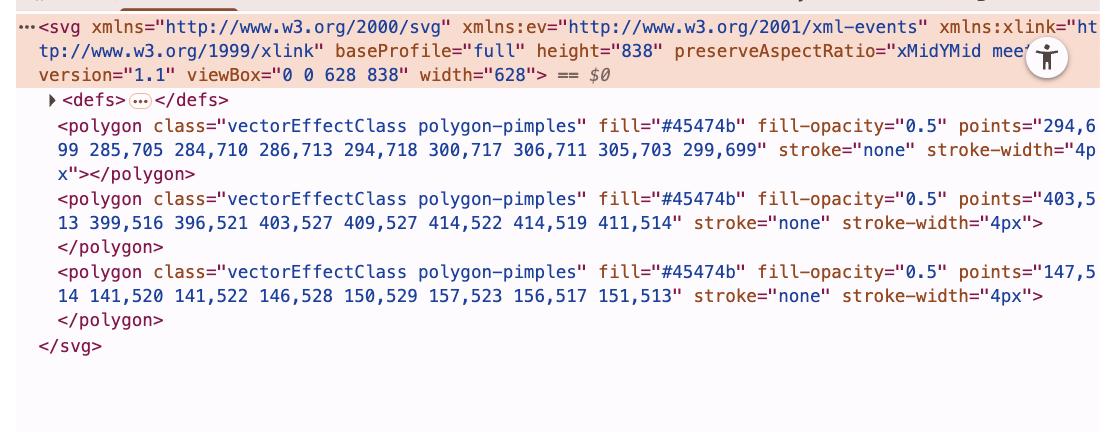
The signed URL mask will contain an SVG element showing the mask.
Example mask:
Pimples mask svg screenshot
How does the html svg element with masks look like
When you receive a signed URL pointing to an SVG mask (e.g. aligned\_face), you can overlay it directly on top of the aligned face image in your UI using standard HTML.
Example how to show SVG in your HTML using JavaScript:
```html
```
## How to map old results
Face Skin Analysis 3.0 returns 49 parameters: 15 **Basic** parameters that are always calculated, and 34 **Advanced** parameters. The tables below map every one of them back to its Face Skin Metrics 2.0 counterpart, where one exists.
{% hint style="info" %}
**Face Skin Analysis 3.0 paths** are relative to the analysis result returned by `GET /api/v4/companies/{company_id}/batches/{image_batch_id}/results/`. A path such as `parameters.pores.score` is read as `response.parameters.pores.score`.
{% endhint %}
{% hint style="info" %}
**Face Skin Metrics 2.0 paths** are shown in short form. `selfie_v2.pores` → `main_metric.value` means `selfie_v2.pores.result.area_results[0].main_metric.value`. Some 3.0 parameters map to a **sub-metric** of a 2.0 algorithm rather than to its main metric — those are shown as `selfie_v2.` → `sub_metrics` → ``.
{% endhint %}
### Basic parameters
Always returned for every batch.
| Face Skin Analysis 3.0 parameter | Result path in 3.0 | Face Skin Metrics 2.0 equivalent | Result path in 2.0 |
| -------------------------------------------------------------------------------------------------------------------------------------------------- | --------------------------------------------- | ----------------------------------------------------------------------------------------------------------------------------------------------- | ---------------------------------------------------------- |
| [Perceived Age Parameter Result Scheme](/haut.ai/developers/saas-api-overview/api-for-face-skin-analysis-3.0/perceived-age.md) | parameters.age.age | [Perceived Age Result Scheme](/haut.ai/developers/saas-api-overview/api-for-face-metrics-2.0/age.md) | selfie\_v2.age → main\_metric.value |
| [Breakouts Parameter Result Scheme](/haut.ai/developers/saas-api-overview/api-for-face-skin-analysis-3.0/breakouts.md) | parameters.breakouts.score (also .grade) | [Acne Result Scheme](/haut.ai/developers/saas-api-overview/api-for-face-metrics-2.0/acne.md) | selfie\_v2.acne → main\_metric.value |
| [Dark Circles Parameter Result Scheme](/haut.ai/developers/saas-api-overview/api-for-face-skin-analysis-3.0/dark-circles.md) | parameters.dark\_circles.score (also .grade) | [Eye Area Condition Result Scheme](/haut.ai/developers/saas-api-overview/api-for-face-metrics-2.0/eye-bags-eye-circles-and-lacrimal-grooves.md) | selfie\_v2.eye\_bags → sub\_metrics → dark\_circles\_score |
| [Eyes Age Parameter Result Scheme](/haut.ai/developers/saas-api-overview/api-for-face-skin-analysis-3.0/eyes-age.md) | parameters.eyes\_age.eyes\_age | [Eye Age Result Scheme](/haut.ai/developers/saas-api-overview/api-for-face-metrics-2.0/eye-age.md) | selfie\_v2.eyes\_age → main\_metric.value |
| [Hydration Parameter Result Scheme](/haut.ai/developers/saas-api-overview/api-for-face-skin-analysis-3.0/hydration.md) | parameters.hydration.score (also .grade) | [Hydration Result Scheme](/haut.ai/developers/saas-api-overview/api-for-face-metrics-2.0/hydration.md) | selfie\_v2.hydration → main\_metric.value |
| [Lines Parameter Result Scheme](/haut.ai/developers/saas-api-overview/api-for-face-skin-analysis-3.0/lines.md) | parameters.lines.score (also .grade) | [Lines Result Scheme](/haut.ai/developers/saas-api-overview/api-for-face-metrics-2.0/wrinkles.md) | selfie\_v2.lines → main\_metric.value |
| [Pigmentation Parameter Result Scheme](/haut.ai/developers/saas-api-overview/api-for-face-skin-analysis-3.0/pigmentation.md) | parameters.pigmentation.score (also .grade) | [Pigmentation Result Scheme](/haut.ai/developers/saas-api-overview/api-for-face-metrics-2.0/pigmentation.md) | selfie\_v2.pigmentation → main\_metric.value |
| [Pores Parameter Result Scheme](/haut.ai/developers/saas-api-overview/api-for-face-skin-analysis-3.0/pores.md) | parameters.pores.score (also .grade, .amount) | [Pores Result Scheme](/haut.ai/developers/saas-api-overview/api-for-face-metrics-2.0/pores.md) | selfie\_v2.pores → main\_metric.value |
| [Under Eye Puffiness Parameter Result Scheme](/haut.ai/developers/saas-api-overview/api-for-face-skin-analysis-3.0/under-eye-puffiness.md) | parameters.puffiness.score (also .grade) | [Eye Area Condition Result Scheme](/haut.ai/developers/saas-api-overview/api-for-face-metrics-2.0/eye-bags-eye-circles-and-lacrimal-grooves.md) | selfie\_v2.eye\_bags → sub\_metrics → eye\_bags\_score |
| [Quality Parameter Result Scheme](/haut.ai/developers/saas-api-overview/api-for-face-skin-analysis-3.0/quality.md) | parameters.quality.front / .left / .right | [Image Quality Result Scheme](/haut.ai/developers/saas-api-overview/api-for-face-metrics-2.0/technical-algorithms-results/image-quality.md) | selfie\_v2.quality → main\_metric.value |
| [Redness Parameter Result Scheme](/haut.ai/developers/saas-api-overview/api-for-face-skin-analysis-3.0/redness.md) | parameters.redness.score (also .grade) | [Redness Result Scheme](/haut.ai/developers/saas-api-overview/api-for-face-metrics-2.0/redness.md) | selfie\_v2.redness → main\_metric.value |
| [Sagging Parameter Result Scheme](/haut.ai/developers/saas-api-overview/api-for-face-skin-analysis-3.0/sagging.md) | parameters.sagging.score (also .grade) | [Sagging Result Scheme](/haut.ai/developers/saas-api-overview/api-for-face-metrics-2.0/deprecated-algorithms-response-scheme/sagging.md) | selfie\_v2.lines → sub\_metrics → sagging\_score |
| [Skin Type Parameter Result Scheme](/haut.ai/developers/saas-api-overview/api-for-face-skin-analysis-3.0/skin-type.md) | parameters.skin\_type.classification | [Skin type Result Scheme](/haut.ai/developers/saas-api-overview/api-for-face-metrics-2.0/skin-type-result-scheme.md) | selfie\_v2.skin\_type → main\_metric.value |
| [Skin Tone Parameter Result Scheme](/haut.ai/developers/saas-api-overview/api-for-face-skin-analysis-3.0/skin-tone.md) | parameters.skintone.classification | [Skin tone Result Scheme](/haut.ai/developers/saas-api-overview/api-for-face-metrics-2.0/skintone_classification.md) | selfie\_v2.skintone-classification → main\_metric.value |
| [Uniformness Parameter Result Scheme](/haut.ai/developers/saas-api-overview/api-for-face-skin-analysis-3.0/uniformness-parameter-result-scheme.md) | parameters.uniformness.score (also .grade) | [Uniformness Result Scheme](/haut.ai/developers/saas-api-overview/api-for-face-metrics-2.0/uniformness.md) | selfie\_v2.uniformness → main\_metric.value |
{% hint style="info" %}
`selfie_v2.skin_type` and `selfie_v2.sagging` were unpublished or disabled by default in Face Skin Metrics 2.0, so many integrations never received them. In Face Skin Analysis 3.0 both are Basic parameters and are always returned.
{% endhint %}
### Advanced parameters
{% hint style="warning" %}
Advanced parameters are returned only if the Face Skin Analysis Advanced metrics add-on is enabled for your company. Contact your account manager to enable it.
{% endhint %}
| Face Skin Analysis 3.0 parameter | Result path in 3.0 | Face Skin Metrics 2.0 equivalent | Result path in 2.0 |
| -------------------------------------------------------------------------------------------------------------------------------------------------------------------- | -------------------------------------------------------------------------------- | ----------------------------------------------------------------------------------------------------------------------------------------------- | -------------------------------------------------------------- |
| [ITA Parameter Result Scheme](/haut.ai/developers/saas-api-overview/api-for-face-skin-analysis-3.0/ita.md) | parameters.ita.ita (also .classification, .l\_channel, .a\_channel, .b\_channel) | [ITA (Individual Typology Angle) Result Scheme](/haut.ai/developers/saas-api-overview/api-for-face-metrics-2.0/skintone.md) | selfie\_v2.skin\_tone → sub\_metrics → ita\_score |
| [Fine Lines Parameter Result Scheme](/haut.ai/developers/saas-api-overview/api-for-face-skin-analysis-3.0/lines/fine-lines.md) | parameters.fine\_lines.score (also .grade) | [Wrinkles Response Scheme](/haut.ai/developers/saas-api-overview/api-for-face-metrics-2.0/deprecated-algorithms-response-scheme/wrinkles.md) | selfie\_v2.wrinkles → sub\_metrics → fine\_wrinkles\_density |
| [Deep Lines Parameter Result Scheme](/haut.ai/developers/saas-api-overview/api-for-face-skin-analysis-3.0/lines/deep-lines.md) | parameters.deep\_lines.score (also .grade) | [Wrinkles Response Scheme](/haut.ai/developers/saas-api-overview/api-for-face-metrics-2.0/deprecated-algorithms-response-scheme/wrinkles.md) | selfie\_v2.wrinkles → sub\_metrics → deep\_wrinkles\_density |
| [Nasolabial Wrinkles Parameter Result Scheme](/haut.ai/developers/saas-api-overview/api-for-face-skin-analysis-3.0/lines/nasolabial-wrinkles.md) | parameters.nasolabial\_wrinkles.grade | — | — |
| [Marionette Lines Parameter Result Scheme](/haut.ai/developers/saas-api-overview/api-for-face-skin-analysis-3.0/lines/marionette-lines.md) | parameters.marionette\_lines.grade | — | — |
| [Forehead Lines Parameter Result Scheme](/haut.ai/developers/saas-api-overview/api-for-face-skin-analysis-3.0/lines/forehead-lines.md) | parameters.forehead\_lines.grade (also .amount, .length) | — | — |
| `forehead_fine_lines` | parameters.forehead\_fine\_lines.amount (also .length) | — | — |
| `forehead_deep_lines` | parameters.forehead\_deep\_lines.amount (also .length) | — | — |
| [Glabellar Lines Parameter Result Scheme](/haut.ai/developers/saas-api-overview/api-for-face-skin-analysis-3.0/lines/glabellar-lines.md) | parameters.glabellar\_lines.grade (also .amount, .length) | — | — |
| `glabellar_fine_lines` | parameters.glabellar\_fine\_lines.amount (also .length) | — | — |
| `glabellar_deep_lines` | parameters.glabellar\_deep\_lines.amount (also .length) | — | — |
| [Under Eye Lines Parameter Result Scheme](/haut.ai/developers/saas-api-overview/api-for-face-skin-analysis-3.0/lines/under-eye-lines.md) | parameters.under\_eye\_lines.grade (also .amount) | — | — |
| `under_eye_fine_lines` | parameters.under\_eye\_fine\_lines.amount | — | — |
| `under_eye_deep_lines` | parameters.under\_eye\_deep\_lines.amount | — | — |
| [Crow's Feet Lines Parameter Result Scheme](/haut.ai/developers/saas-api-overview/api-for-face-skin-analysis-3.0/lines/crow-s-feet-lines.md) | parameters.crows\_feet\_lines.grade (also .amount) | — | — |
| `crows_feet_fine_lines` | parameters.crows\_feet\_fine\_lines.amount | — | — |
| `crows_feet_deep_lines` | parameters.crows\_feet\_deep\_lines.amount | — | — |
| [Eye Lines Parameter Result Scheme](/haut.ai/developers/saas-api-overview/api-for-face-skin-analysis-3.0/lines/eye-lines.md) | parameters.eyes\_lines.grade (also .score) | — | — |
| [Jowls Parameter Result Scheme](/haut.ai/developers/saas-api-overview/api-for-face-skin-analysis-3.0/sagging/jowls.md) | parameters.jowls.grade | [Lines Result Scheme](/haut.ai/developers/saas-api-overview/api-for-face-metrics-2.0/wrinkles.md) | selfie\_v2.lines → sub\_metrics → jowls\_grade |
| [Lacrimal Grooves Parameter Result Scheme](/haut.ai/developers/saas-api-overview/api-for-face-skin-analysis-3.0/sagging/lacrimal-grooves.md) | parameters.lacrimal\_grooves.score (also .grade) | [Eye Area Condition Result Scheme](/haut.ai/developers/saas-api-overview/api-for-face-metrics-2.0/eye-bags-eye-circles-and-lacrimal-grooves.md) | selfie\_v2.eye\_bags → sub\_metrics → lacrimal\_grooves\_score |
| [Enlarged Pores Parameter Result Scheme](/haut.ai/developers/saas-api-overview/api-for-face-skin-analysis-3.0/pores/enlarged-pores.md) | parameters.enlarged\_pores.amount | [Pores Result Scheme](/haut.ai/developers/saas-api-overview/api-for-face-metrics-2.0/pores.md) | selfie\_v2.pores → sub\_metrics → pores\_number |
| [Freckles Parameter Result Scheme](/haut.ai/developers/saas-api-overview/api-for-face-skin-analysis-3.0/pigmentation/freckles.md) | parameters.freckles.density | — | — |
| [Moles Parameter Result Scheme](/haut.ai/developers/saas-api-overview/api-for-face-skin-analysis-3.0/pigmentation/moles.md) | parameters.moles.amount | — | — |
| [Melasma Parameter Result Scheme](/haut.ai/developers/saas-api-overview/api-for-face-skin-analysis-3.0/pigmentation/melasma.md) | parameters.melasma.density | — | — |
| [Sun Spots Parameter Result Scheme](/haut.ai/developers/saas-api-overview/api-for-face-skin-analysis-3.0/pigmentation/sun-spots.md) | parameters.sun\_spots.density (also .amount, .grade, .score) | `selfie_v2.age_spots` (feature-flagged in 2.0, no doc page) | selfie\_v2.age\_spots → main\_metric.value |
| [Pimples Parameter Result Scheme](/haut.ai/developers/saas-api-overview/api-for-face-skin-analysis-3.0/breakouts/pimples.md) | parameters.pimples.amount (also .grade) | — | — |
| [Papules Parameter Result Scheme](/haut.ai/developers/saas-api-overview/api-for-face-skin-analysis-3.0/breakouts/papules.md) | parameters.papules.amount (also .grade) | — | — |
| [Pustules Parameter Result Scheme](/haut.ai/developers/saas-api-overview/api-for-face-skin-analysis-3.0/breakouts/pustules.md) | parameters.pustules.amount (also .grade) | — | — |
| [Acne Inflammation Parameter Result Scheme](/haut.ai/developers/saas-api-overview/api-for-face-skin-analysis-3.0/breakouts/acne-inflammation.md) | parameters.inflammation.density (also .grade) | — | — |
| [Post-acne Hyperpigmentation Parameter Result Scheme](/haut.ai/developers/saas-api-overview/api-for-face-skin-analysis-3.0/breakouts/post-acne-hyperpigmentation.md) | parameters.post\_acne\_hyperpigmentation.density (also .grade) | — | — |
| [Irritation Parameter Result Scheme](/haut.ai/developers/saas-api-overview/api-for-face-skin-analysis-3.0/redness/irritation.md) | parameters.irritation.score (also .grade) | — | — |
## New & Deprecated Metrics/Parameters
### New in Face Skin Analysis 3.0
Parameters with no Face Skin Metrics 2.0 counterpart:
* **Lines by facial region** — [Forehead Lines Parameter Result Scheme](/haut.ai/developers/saas-api-overview/api-for-face-skin-analysis-3.0/lines/forehead-lines.md), [Glabellar Lines Parameter Result Scheme](/haut.ai/developers/saas-api-overview/api-for-face-skin-analysis-3.0/lines/glabellar-lines.md), [Under Eye Lines Parameter Result Scheme](/haut.ai/developers/saas-api-overview/api-for-face-skin-analysis-3.0/lines/under-eye-lines.md), [Crow's Feet Lines Parameter Result Scheme](/haut.ai/developers/saas-api-overview/api-for-face-skin-analysis-3.0/lines/crow-s-feet-lines.md), [Eye Lines Parameter Result Scheme](/haut.ai/developers/saas-api-overview/api-for-face-skin-analysis-3.0/lines/eye-lines.md), [Nasolabial Wrinkles Parameter Result Scheme](/haut.ai/developers/saas-api-overview/api-for-face-skin-analysis-3.0/lines/nasolabial-wrinkles.md), [Marionette Lines Parameter Result Scheme](/haut.ai/developers/saas-api-overview/api-for-face-skin-analysis-3.0/lines/marionette-lines.md), and their `_fine_lines` / `_deep_lines` variants
* **Breakouts breakdown** — [Pimples Parameter Result Scheme](/haut.ai/developers/saas-api-overview/api-for-face-skin-analysis-3.0/breakouts/pimples.md), [Papules Parameter Result Scheme](/haut.ai/developers/saas-api-overview/api-for-face-skin-analysis-3.0/breakouts/papules.md), [Pustules Parameter Result Scheme](/haut.ai/developers/saas-api-overview/api-for-face-skin-analysis-3.0/breakouts/pustules.md), [Acne Inflammation Parameter Result Scheme](/haut.ai/developers/saas-api-overview/api-for-face-skin-analysis-3.0/breakouts/acne-inflammation.md), [Post-acne Hyperpigmentation Parameter Result Scheme](/haut.ai/developers/saas-api-overview/api-for-face-skin-analysis-3.0/breakouts/post-acne-hyperpigmentation.md)
* **Pigmentation breakdown** — [Freckles Parameter Result Scheme](/haut.ai/developers/saas-api-overview/api-for-face-skin-analysis-3.0/pigmentation/freckles.md), [Moles Parameter Result Scheme](/haut.ai/developers/saas-api-overview/api-for-face-skin-analysis-3.0/pigmentation/moles.md), [Melasma Parameter Result Scheme](/haut.ai/developers/saas-api-overview/api-for-face-skin-analysis-3.0/pigmentation/melasma.md)
* [Irritation Parameter Result Scheme](/haut.ai/developers/saas-api-overview/api-for-face-skin-analysis-3.0/redness/irritation.md)
* [Enlarged Pores Parameter Result Scheme](/haut.ai/developers/saas-api-overview/api-for-face-skin-analysis-3.0/pores/enlarged-pores.md)
### Promoted to top-level parameters
These existed in Face Skin Metrics 2.0 only as sub-metrics of another algorithm. In Face Skin Analysis 3.0 they are parameters in their own right:
* [Under Eye Puffiness Parameter Result Scheme](/haut.ai/developers/saas-api-overview/api-for-face-skin-analysis-3.0/under-eye-puffiness.md) — was `eye_bags_score` inside `selfie_v2.eye_bags`
* [Sagging Parameter Result Scheme](/haut.ai/developers/saas-api-overview/api-for-face-skin-analysis-3.0/sagging.md) — was `sagging_score` inside `selfie_v2.lines`
* [Lacrimal Grooves Parameter Result Scheme](/haut.ai/developers/saas-api-overview/api-for-face-skin-analysis-3.0/sagging/lacrimal-grooves.md) — was `lacrimal_grooves_score` inside `selfie_v2.eye_bags`
* [Jowls Parameter Result Scheme](/haut.ai/developers/saas-api-overview/api-for-face-skin-analysis-3.0/sagging/jowls.md) — was `jowls_grade` inside `selfie_v2.lines`
* [ITA Parameter Result Scheme](/haut.ai/developers/saas-api-overview/api-for-face-skin-analysis-3.0/ita.md) — was `ita_score` inside `selfie_v2.skin_tone`
### Missing in Face Skin Analysis 3.0
* [Translucency Result Scheme](/haut.ai/developers/saas-api-overview/api-for-face-metrics-2.0/deprecated-algorithms-response-scheme/translucency.md) — no direct equivalent. The closest signal is [Skin Type Parameter Result Scheme](/haut.ai/developers/saas-api-overview/api-for-face-skin-analysis-3.0/skin-type.md).
***
{% hint style="warning" %}
Not a Haut.AI client yet?
{% endhint %}
Book a demoFace Skin Analysis 3.0 on haut.ai
---
# Agent Instructions
This documentation is published with GitBook. GitBook is the documentation platform designed so that both humans and AI agents can read, navigate, and reason over technical content effectively. Learn more at gitbook.com.
## Querying This Documentation
If you need additional information that is not directly available in this page, you can query the documentation dynamically by asking a question.
Perform an HTTP GET request on the current page URL with the `ask` query parameter, and the optional `goal` query parameter:
```
GET https://docs.saas.haut.ai/haut.ai/developers/saas-api-overview/api-for-face-skin-analysis-3.0/migrate-from-face-skin-metrics-2.0-to-face-skin-analysis-3.0.md?ask=&goal=
```
`ask` is the immediate question: it should be specific, self-contained, and written in natural language.
`goal` is optional and describes the broader end goal you are ultimately trying to accomplish on behalf of the user. GitBook uses it to tailor the answer towards what is most useful for that goal.
The response will contain a direct answer to the question and relevant excerpts and sources from the documentation.
Use this mechanism when the answer is not explicitly present in the current page, you need clarification or additional context, or you want to retrieve related documentation sections.