> For the complete documentation index, see [llms.txt](https://docs.saas.haut.ai/haut.ai/llms.txt). Markdown versions of documentation pages are available by appending `.md` to page URLs; this page is available as [Markdown](https://docs.saas.haut.ai/haut.ai/haut.ai-features/algorithms/face-skin-analysis-3-0.md).
# Face Skin Analysis 3.0
What Face Skin Analysis 3.0 covers: the parameters included, availability, input requirements, and its dependencies on other applications.
{% hint style="warning" %}
**Disclaimer**
Face Skin Analysis 3.0 Application Algorithms are not intended to be a substitute for professional medical advice, diagnosis or treatment.
None of the provided skin health parameters estimations can be treated as health advice.
Always seek the advice of your physician or other qualified healthcare provider on any medical condition or treatment as well as before undertaking any healthcare regimen.
{% endhint %}
## Purpose, Scope and Limitations
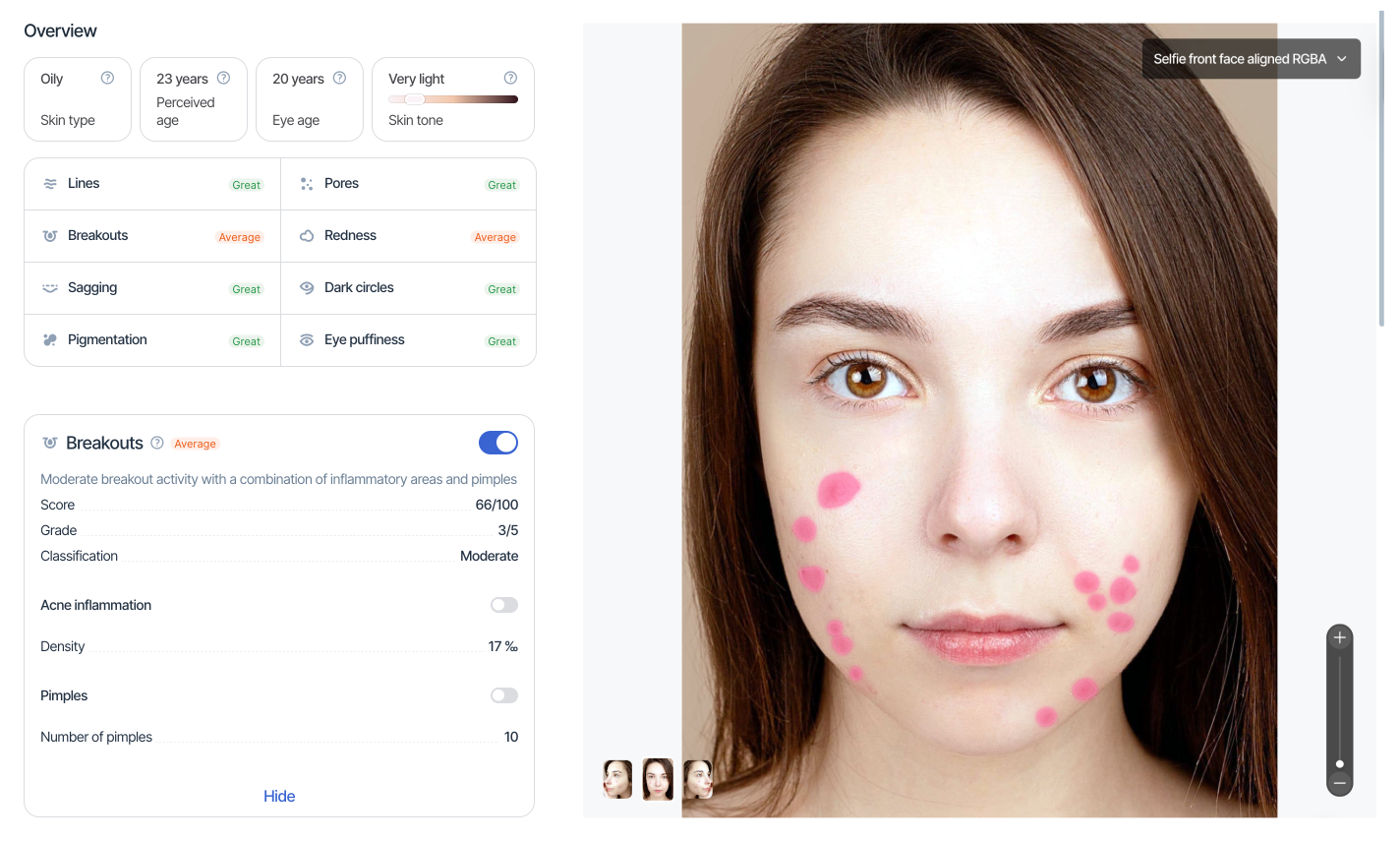
Face Skin Analysis 3.0 Application provides [Algorithms](/haut.ai/haut.ai-features/algorithms.md) that perform the analysis of skin visual appearance on the facial area. The analysis is aimed at evaluating the visible and measurable skin condition parameters.
For a product-level overview of what the application does and who it is for, see [Face Analysis 3.0](https://haut.ai/product/face-skin-analysis?utm_source=referral\&utm_medium=saas_docs\&utm_campaign=Docs_SaaS_HautAI) on haut.ai.
***
## Parameters included in Face Skin Analysis 3.0 Application
These parameters are designed to evaluate visible and measurable skin health parameters.
{% hint style="warning" %}
**Disclaimer**
By default, advanced parameters of Face Skin Analysis 3.0 are not available and are only displayed when the advanced parameters option is enabled. This option is available as a paid add-on.
Please contact your account manager to upgrade your subscription with Advanced Parameters add-on.
{% endhint %}
| Parameter | Basic | Advanced |
| --------------------------------------------------------------------------------------------------------- | ------------------------------------------------------------------------------------------------------------------------------------------------------------------------------------------------------------------------------------------------------------------------------------------- | ----------------------------------------------------------------------------------------------------------------------------------------------------------------------------------------------------------------------------------------------------------------------------------------------------------------------------------------------------------------------------------------------------------------------------------------------------------------------------------------------------------------------------------------------------------------------------------------------------------------------------------------------------------------------------------------------------------------------------------------------------------------------------------------------------------------------------------------------------------------------------------------------------------------------------------------------------------------------------------------------------------------------------------------------------------------------------------------------------------------------------------------------------------------------------------------------------------------------------------------------------------------------------------------------------------------------------------------------------------------------------------------------------------------------------------------------------------------------------------------------------------------------------------------------------------------------------------------------------------------------------- |
| [Breakouts](/haut.ai/haut.ai-features/algorithms/face-skin-analysis-3-0/breakouts.md) |
Score for the forehead, left cheek, and right cheek
|
***
## Availability of Face Skin Analysis 3.0 Application
Face Skin Analysis 3.0 Application is available via API for Professional plan clients. See the detailed API doc: [API for Face Skin Analysis 3.0](/haut.ai/developers/saas-api-overview/api-for-face-skin-analysis-3.0.md).
***
## Input Requirements
### Input Data
Face Skin Analysis 3.0 Application requires a high-resolution portrait photograph of a human face with:
* Neutral facial expression.
* No face-covering accessories or obstructions.
* Clear skin, no make-up.
Face Skin Analysis 3.0 Application supports input in the form of:
* A single frontal portrait image.
* A triplet (3) of frontal, right, and left portrait images using Face 180 technology and [LIQA](https://docs.liqa.haut.ai/customization/user-flow/presets.html#face-180).
### Dependency on Other Applications
Face Skin Analysis 3.0 Application does not depend on other applications and can be used directly with input data.
### Special features
Face Skin Analysis 3.0 Application supports analysis of anonymized images.
***
## Output Details
### Output Data
Face Skin Analysis 3.0 Application returns a **variable** set of numerical and categorical estimations of visible and measurable skin health parameters. API responses include the calculated `parameters`, the overall `all_algorithms_calculated` status, per-side `detection_errors`, and available `predicted_images` such as original, anonymised, and aligned face images.
* For the Professional plan, the output is available via API, see [API for Face Skin Analysis 3.0](/haut.ai/developers/saas-api-overview/api-for-face-skin-analysis-3.0.md).
* It's not yet available for the Advanced+ plan.
### Dependency for Other Applications
Face Analysis 3.0 Application could be used as an input data in order for the following applications to be executed:
* [Recommendation System 2.0](/haut.ai/haut.ai-features/algorithms/recommendation-system-2.0.md)
***
## FAQ
### What is the minimum photo resolution for reliable results?
The minimum image resolution for reliable skin analysis is an image at least 2500 pixels wide and 2500 pixels high, with the face occupying at least 85% of the image.
### What is the actual processing time for Face Skin Analysis 3.0?
For Face Skin Analysis 3.0, the processing time averages under 5 seconds for 95% of images.
### How accurate is Face Skin Analysis 3.0?
Face Skin Analysis 3.0 algorithms were trained on over 30 million real skin images. The algorithms are validated by dermatologists, ensuring high accuracy across diverse skin types and ethnicities. For more details, please reach out to your customer success manager.
***
{% hint style="warning" %}
Not a Haut.AI client yet?
{% endhint %}
Book a demoFace Skin Analysis 3.0 on haut.ai
---
# Agent Instructions
This documentation is published with GitBook. GitBook is the documentation platform designed so that both humans and AI agents can read, navigate, and reason over technical content effectively. Learn more at gitbook.com.
## Querying This Documentation
If you need additional information that is not directly available in this page, you can query the documentation dynamically by asking a question.
Perform an HTTP GET request on the current page URL with the `ask` query parameter, and the optional `goal` query parameter:
```
GET https://docs.saas.haut.ai/haut.ai/haut.ai-features/algorithms/face-skin-analysis-3-0.md?ask=&goal=
```
`ask` is the immediate question: it should be specific, self-contained, and written in natural language.
`goal` is optional and describes the broader end goal you are ultimately trying to accomplish on behalf of the user. GitBook uses it to tailor the answer towards what is most useful for that goal.
The response will contain a direct answer to the question and relevant excerpts and sources from the documentation.
Use this mechanism when the answer is not explicitly present in the current page, you need clarification or additional context, or you want to retrieve related documentation sections.