> For the complete documentation index, see [llms.txt](https://docs.saas.haut.ai/haut.ai/llms.txt). Markdown versions of documentation pages are available by appending `.md` to page URLs; this page is available as [Markdown](https://docs.saas.haut.ai/haut.ai/haut.ai-features/algorithms/face-skin-analysis-3-0/hydration.md).

# Hydration

What the Hydration parameter estimates, the facial areas it covers, how to read its scores and grades, and how to interpret its mask.

## About Parameter

This parameter estimates the visual signs of dehydrated skin on the face.

## Features

1. Multi-area analysis: forehead, right cheek, left cheek.
2. Works with 1 and 3 side facial images.

## Output

1. Score from 1 to 100.
2. Grade from 1 to 5.
3. Algorithm-assigned skin condition tag (Great, Good, Average, Poor).
4. Vector mask.

## Scores & Grades Description

<table><thead><tr><th width="119.73828125">Score value</th><th width="120.359375">Grade value</th><th width="360.046875">Description</th><th>Tags</th></tr></thead><tbody><tr><td>100-90</td><td>1</td><td>No visible signs of dryness</td><td>Great</td></tr><tr><td>89-80</td><td>2</td><td>Light signs of dehydrations are present, dry patches occasionally cover skin, flacking is low</td><td>Good</td></tr><tr><td>50-79</td><td>3</td><td>Area covered by dry patches presents signs of mild scaling, flacking is high</td><td>Average</td></tr><tr><td>30-49</td><td>4</td><td>Patches of dehydration cover significant part of the skin, flacking is high, scaling of the skin is present in the most cases</td><td>Poor</td></tr><tr><td>&#x3C;30</td><td>5</td><td>Skin is presenting a severe signs of dehydration all over the area: dryness patches, flacking, cracking, and scaling.</td><td>Poor</td></tr></tbody></table>

## Mask Interpretation

The hydration mask is a **defect heatmap, not a coverage map**. It is not meant to cover the entire face — large unshaded regions are expected and carry meaning. An unshaded area falls into one of three categories.

### 1. Outside the analyzed zones

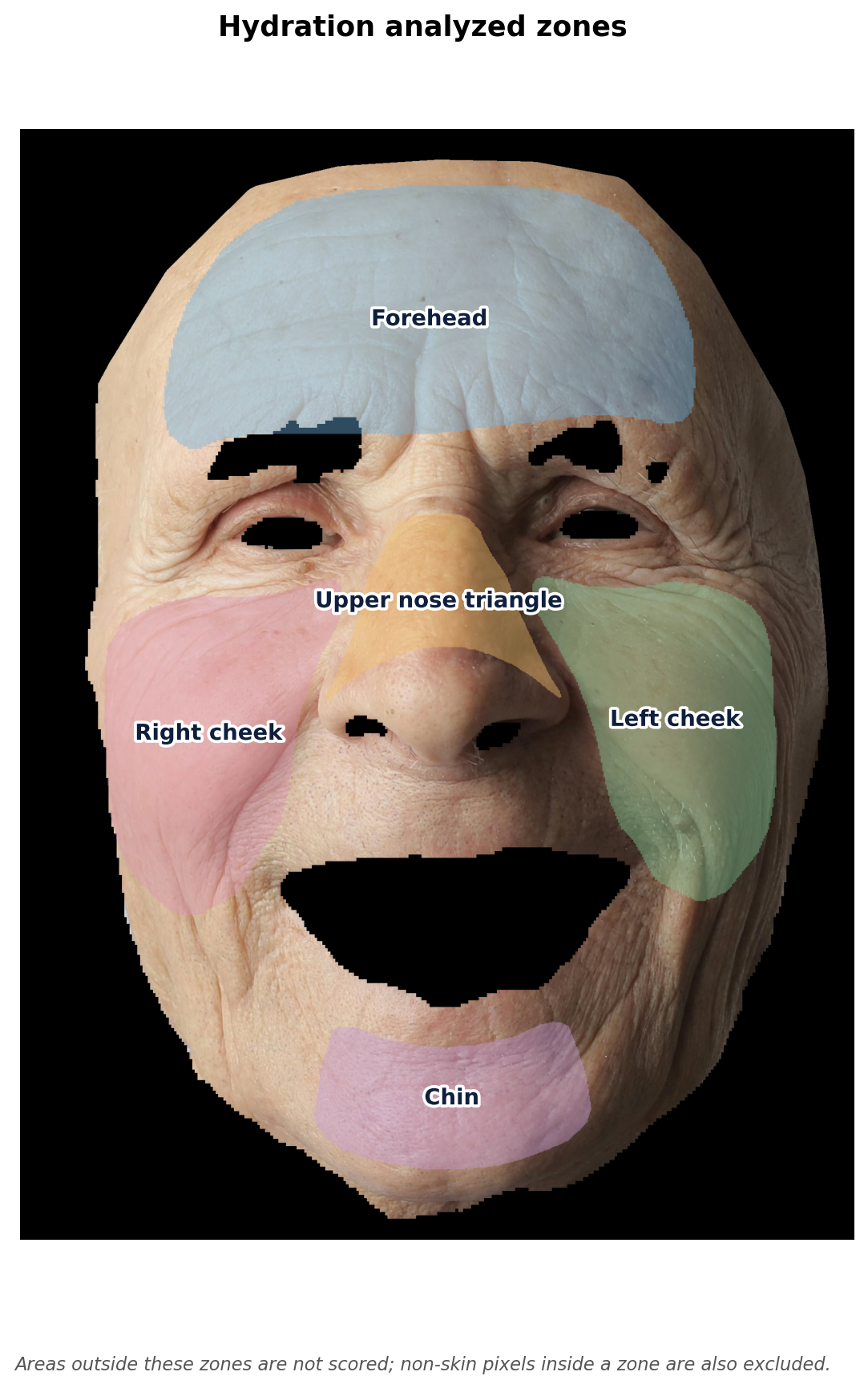
Hydration is evaluated only in five anatomical regions defined on the face mesh:

* forehead
* upper nose triangle
* left cheek
* right cheek
* chin

<figure><img src="https://245161714-files.gitbook.io/~/files/v0/b/gitbook-x-prod.appspot.com/o/spaces%2F-MWxBX_zB4FnflOpyBGO%2Fuploads%2Fgit-blob-17f9b23f302b5a755cdf24b66a41e15afb1432b0%2Fhydration-analyzed-zones.png?alt=media" alt="The five hydration zones overlaid on a face: forehead, upper nose triangle, left cheek, right cheek, and chin"><figcaption><p>The five regions analyzed for hydration. Pixels outside these zones are not scored.</p></figcaption></figure>

Anything outside these zones — temples, under-eyes, jawline edges, the area around the mouth — is never scored and therefore never shaded. This is by design: those regions either lack reliable skin signal (shadowing, occlusion, makeup, hair) or carry features that would bias the dryness estimate.

### 2. Non-skin pixels inside a zone

Within each zone a skin-segmentation gate is applied. Eyebrows, eyelashes, lips, nostrils, glasses, facial hair, stray hair strands, and any pixel not classified as skin are excluded. Even inside, for example, the forehead region, you will see "holes" wherever the pixel is not skin.

### 3. Skin with no detected hydration defect

This is the case that most often surprises users. The mask only lights up where the algorithm finds one of three indirect dryness signals:

| Signal               | Where it is computed   | What it captures                                           |
| -------------------- | ---------------------- | ---------------------------------------------------------- |
| Peeling / flaking    | cheeks, forehead, chin | Whitish micro-regions detected in LAB and HSV color spaces |
| Fine lines / cracks  | cheeks only            | Ridge-filter response to linear surface discontinuities    |
| Irritation / redness | forehead, nose, chin   | Color deviation from local skin tone                       |

Each signal has a noise floor below which the response is set to zero. A patch of skin that shows no peeling, no fine-line ridges, and no redness above those thresholds will remain transparent.

### How to read an unshaded region

If the area is inside the five analyzed zones and is recognized as skin, "no shading" means the algorithm did not detect any visual evidence of dryness there. It is treated as adequately hydrated relative to the algorithm's sensitivity. It is not "missing data" — it is the algorithm's vote of confidence for that pixel.

The colored gradient encodes severity **only where evidence exists**. Healthy, well-hydrated skin produces a sparse mask; severely dehydrated skin produces a dense one.

### Color scale

Where the mask is shaded, color encodes the hydration level. With the default color scale, cooler colors (blue) mark higher hydration and warmer colors (red) mark lower hydration.

<figure><img src="https://245161714-files.gitbook.io/~/files/v0/b/gitbook-x-prod.appspot.com/o/spaces%2F-MWxBX_zB4FnflOpyBGO%2Fuploads%2Fgit-blob-3db0e093e5953d07e568992c7333c748a7ba83e1%2Fhydration-mask-legend.svg?alt=media" alt="Hydration mask color scale, from blue (high hydration) on the left through green and yellow to red (low hydration) on the right"><figcaption><p>Default color scale for the hydration mask.</p></figcaption></figure>

***

## Algorithm API

{% hint style="warning" %}
API access is available only for <mark style="color:purple;">**Professional**</mark> plan clients
{% endhint %}

See [Hydration Parameter Result Scheme](/haut.ai/developers/saas-api-overview/api-for-face-skin-analysis-3.0/hydration.md).

***

{% hint style="warning" %}
Not a Haut.AI client yet?
{% endhint %}

<a href="https://haut.ai/book-a-demo?utm_source=referral&#x26;utm_medium=saas_docs&#x26;utm_campaign=Docs_SaaS_HautAI" class="button primary" data-icon="user-vneck">Book a demo</a> <a href="https://haut.ai/product/face-skin-analysis?utm_source=referral&#x26;utm_medium=saas_docs&#x26;utm_campaign=Docs_SaaS_HautAI" class="button secondary" data-icon="external-link">Face Skin Analysis 3.0 on haut.ai</a>


---

# Agent Instructions
This documentation is published with GitBook. GitBook is the documentation platform designed so that both humans and AI agents can read, navigate, and reason over technical content effectively. Learn more at gitbook.com.

## Querying This Documentation
If you need additional information that is not directly available in this page, you can query the documentation dynamically by asking a question.

Perform an HTTP GET request on the current page URL with the `ask` query parameter, and the optional `goal` query parameter:

```
GET https://docs.saas.haut.ai/haut.ai/haut.ai-features/algorithms/face-skin-analysis-3-0/hydration.md?ask=<question>&goal=<endgoal>
```

`ask` is the immediate question: it should be specific, self-contained, and written in natural language.
`goal` is optional and describes the broader end goal you are ultimately trying to accomplish on behalf of the user. GitBook uses it to tailor the answer towards what is most useful for that goal.

The response will contain a direct answer to the question and relevant excerpts and sources from the documentation.

Use this mechanism when the answer is not explicitly present in the current page, you need clarification or additional context, or you want to retrieve related documentation sections.
