> For the complete documentation index, see [llms.txt](https://docs.saas.haut.ai/haut.ai/llms.txt). Markdown versions of documentation pages are available by appending `.md` to page URLs; this page is available as [Markdown](https://docs.saas.haut.ai/haut.ai/haut.ai-features/consumer-apps/configure-advanced-settings.md).
# Configure Advanced Settings
This page describes advanced settings, allowing for higher degree of user experience customization.
Advanced settings of Consumer App allows for high degree of customization to different use cases.
## Accessing Advanced Settings
1. Navigate to [Consumer Apps](https://saas.haut.ai/app/skin-consultant/dashboard) tab on the menu of SaaS platform.
2. Navigate to your Consumer App details by clicking on name of your app in the list of apps.
3. Open the `Advanced` tab.
## Photo retention
{% hint style="info" %}
Retention is no longer set here. It is configured on the dataset your app writes to, and now covers photos, metrics and results, and survey answers. Open **Datasets**, click the dataset linked to your app, then **Settings → General → Data retention**. See [Data Retention](/haut.ai/haut.ai-features/datasets/data-retention.md).
{% endhint %}
Your previous **Forever** or **One Day** choice was carried over to the dataset unchanged.
## Camera for taking photos
{% hint style="success" %}
Good for: building offline experience with specialist available, i.e. using Consumer App in skin clinics.
{% endhint %}
You can choose which camera (front or back) of the device users can use for taking photos. Consider the following suggestions:
* `Front camera` is the best option for selfies if you want your customers to take their photos for the skin analysis themselves. They can see the instructions easily on the screens of their devices.
* `Back camera` is the best option if you’d like to use the Consumer App on-site. For example, you’d like your specialists to take photos of your customers with an iPad in your salon, store, etc.
* Select `Front & back` if you want to allow clients to switch between cameras. This is useful if your experience, for example, can be both used by consultants in store to capture photos of visitors and consumers themselves.
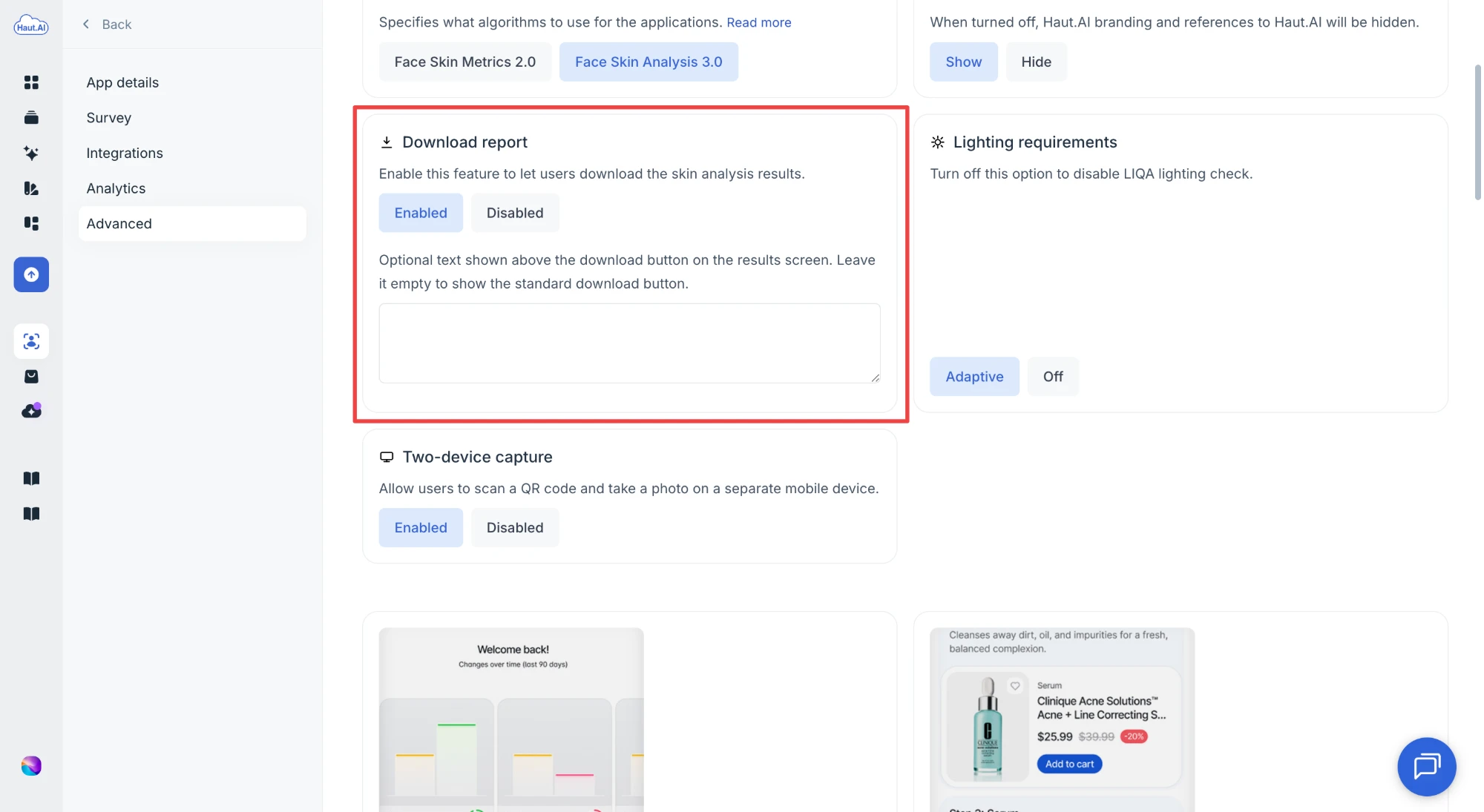
## Download report
{% hint style="success" %}
Good for: allowing users to access results of AI Skin Analysis and recommendations after the initial session.
{% endhint %}
Enable this feature to allow users download the skin analysis results as a PDF report.
### Text above the download button
Optionally, add a short text that is shown above the download button on the results screen, up to 200 characters. Use it when you want users to do something specific with the report, for example *Download your result and share it with your consultant*. Leave the field empty to show the standard download button. Works in Skin and Hair apps.
## Lighting requirements
This feature allows to set how strict should be light requirements for the photo capture.
Available options:
* `Adaptive`: experience starts with a strict requirements to the lighting intensity and direction, but gradually decreases to a certain degree to allow end-users to capture a photo. This is useful in most cases. This option specifically designed to try to capture photos of the best quality, but without much harm to the conversion rate.
* `None`: experience starts without any requirements to the lighting intensity and direction. This option is useful if the lightning environment is poor, but you still want users to take the experience.
{% hint style="warning" %}
Please note that poor ligthning might cause decreased or poor accuracy of the analysis.
{% endhint %}
## Two-device capture
Two-device capture feature enhances the desktop user experience by allowing users to continue the photo capture flow on their mobile device.
## Returning user experience
Show your clients how their skin metrics have changed over the last 90 days. By allowing customers to see changes in skin condition over time, you can clearly show the effect of your products.

{% hint style="success" %}
User recognition will work in the following cases:
* if the user has opened the service from the same browser as before
* browser settings allow the use of cookies
* the user has at least 1 measurement in the past 90 days
{% endhint %}
### Past recommendations
Returning users also see the products recommended by their previous analysis, next to the metrics comparison. They get their routine back without retaking a photo, which gives you one more chance to show the products they already matched with.
The block shows the recommendations from the user's most recent analysis in the last 90 days. It needs an app that runs [Product Recommendation System 2.0](/haut.ai/haut.ai-features/product-recommendation-system-2.0.md) on [Face Skin Analysis 3.0](/haut.ai/haut.ai-features/algorithms/face-skin-analysis-3-0.md), so it does not appear in Hair Consultant apps.
Products are checked against your catalog before they are shown:
* Products that are no longer on the [Product Shelf](/haut.ai/haut.ai-features/product-recommendation-system-2.0/product-shelf.md) attached to the app, or that you marked **Out of stock**, are left out.
* Prices, names, and images are read from your catalog at the moment the user opens the app, not from the day of the analysis. A price you changed since then is the price the user sees.
{% hint style="info" %}
If none of the previously recommended products are still available, the block is hidden. The rest of the returning user experience is not affected.
{% endhint %}
## Show price
Show or hide prices for product recommendations and routines. We recommend showing prices, as it leads to higher conversion rates.
{% hint style="info" %}
The setting does affect how the recommendation will be displayed in the PDF reports.
{% endhint %}
## Routine view
There are two options for showing product recommendations on the results pages: routines or a simple list of products by group. Routines are a step-by-step guide to a personalized daily skincare routine. They feature a selection of carefully curated, daily-use skincare products that complement each other and target identified concerns.
{% hint style="info" %}
The setting does affect how the recommendation will be displayed in the PDF reports.
{% endhint %}
## Metrics values
Allows you to show or hide metrics values. By deShow or hide prices for product recommendations and routines. We recommend showing prices, as it leads to higher conversion rates.
## Google Analytics tracker
You can easily add your [Google Analytics](https://marketingplatform.google.com/about/analytics/) tracking code to any of your Consumer Apps to track visitor behavior and demographics. The Consumer App and Google Analytics integration lets you track when a user started the session, get recommendations, add products to the product cart, and other events. Check feature details here: [Connect Google Analytics to Your Consumer App](/haut.ai/haut.ai-features/consumer-apps/connect-google-analytics-to-your-consumer-app.md).
## Translation
Consumer App supports more than 20 languages. By default, the application switches to the language of the user's device if it is supported by the system; otherwise, Consumer App will be in English. You can override this functionality by limiting your Consumer App to always be displayed in one selected language.
{% hint style="info" %}
The setting does not affect the b2b portal, the PDF reports, the survey questions, or the product names that you manually entered.
{% endhint %}
## Rename and reorder product categories
Rename and reorder product categories to better match your products. This will also rename routine steps. Please note renaming does not support translations.
{% hint style="info" %}
The setting does affect the order and naming of categories in the PDF reports.
{% endhint %}
## Customize metrics
Hide or rename skin metrics and their descriptions for end users. Note that hidden metrics are still processed and available for you in the dataset.
Note that for renamed metrics, the automatic translation feature is not applied. Note that for renamed metrics, the enforced translation also does not apply.
## Rename "Buy online" button text for recommendations
You can rename the "Buy online" button to better match the action in your Consumer App.
## Skin facts and tips
Skin facts are facts about the skin and its health that are shown during the analysis of the photo. You can replace these facts with your own texts (up to 5).

{% hint style="info" %}
Note that when replaced with custom texts, the skin facts would not be translated using the auto-translation feature or enforced translation.
{% endhint %}
## Show/hide product recommendations
If you do not sell products or services, you can disable the display of the recommendations block.
## Show/hide "You may also like" block
By default, the “You may also like” block shows all relevant products that were not shown in the main routine. You can hide this block if needed.
## Show/hide recommendations reason
By default, the system displays the reason why a product was recommended. You can hide this block if needed.
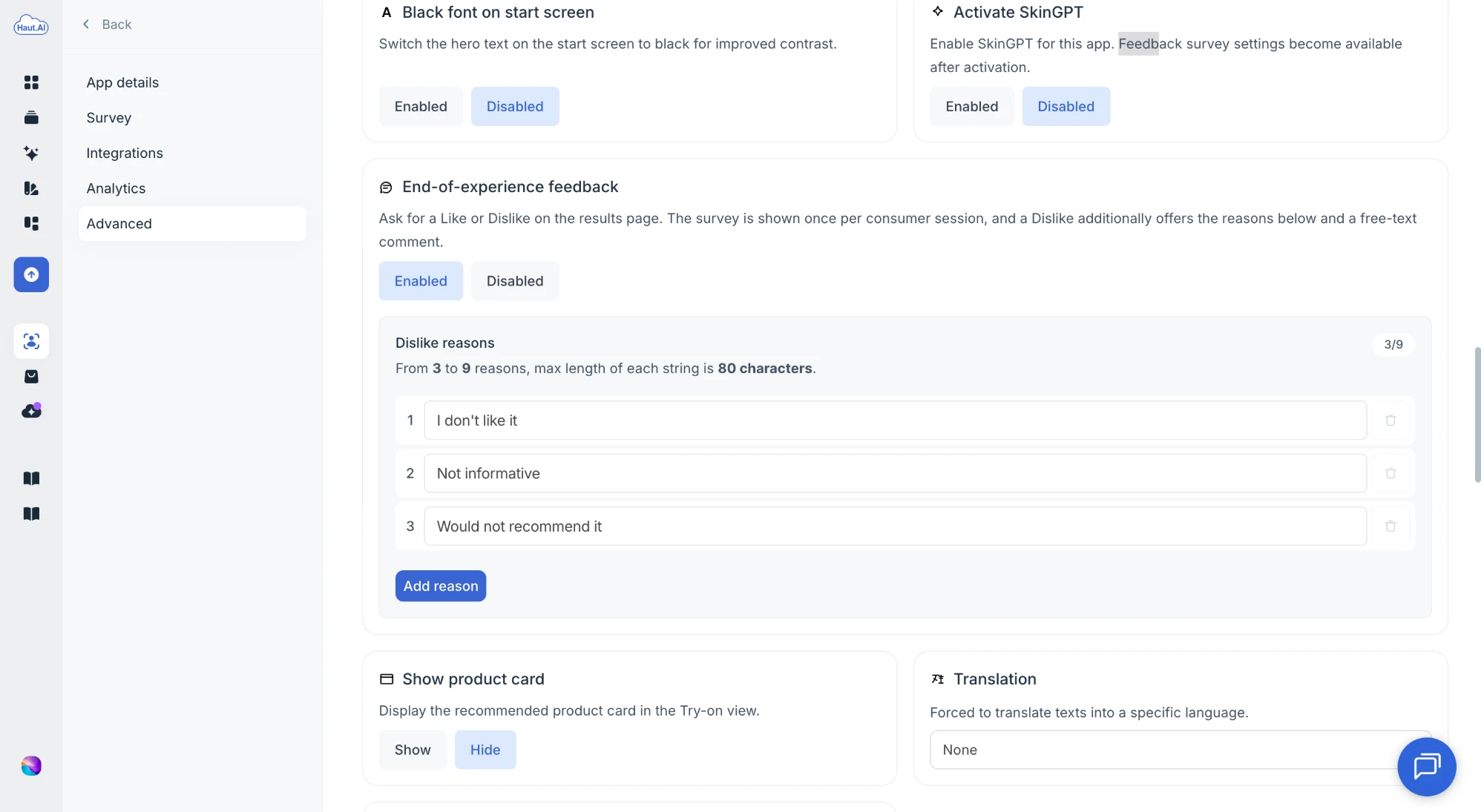
## End-of-experience feedback
{% hint style="success" %}
Good for: learning whether users find the analysis and recommendations useful, without a full survey.
{% endhint %}
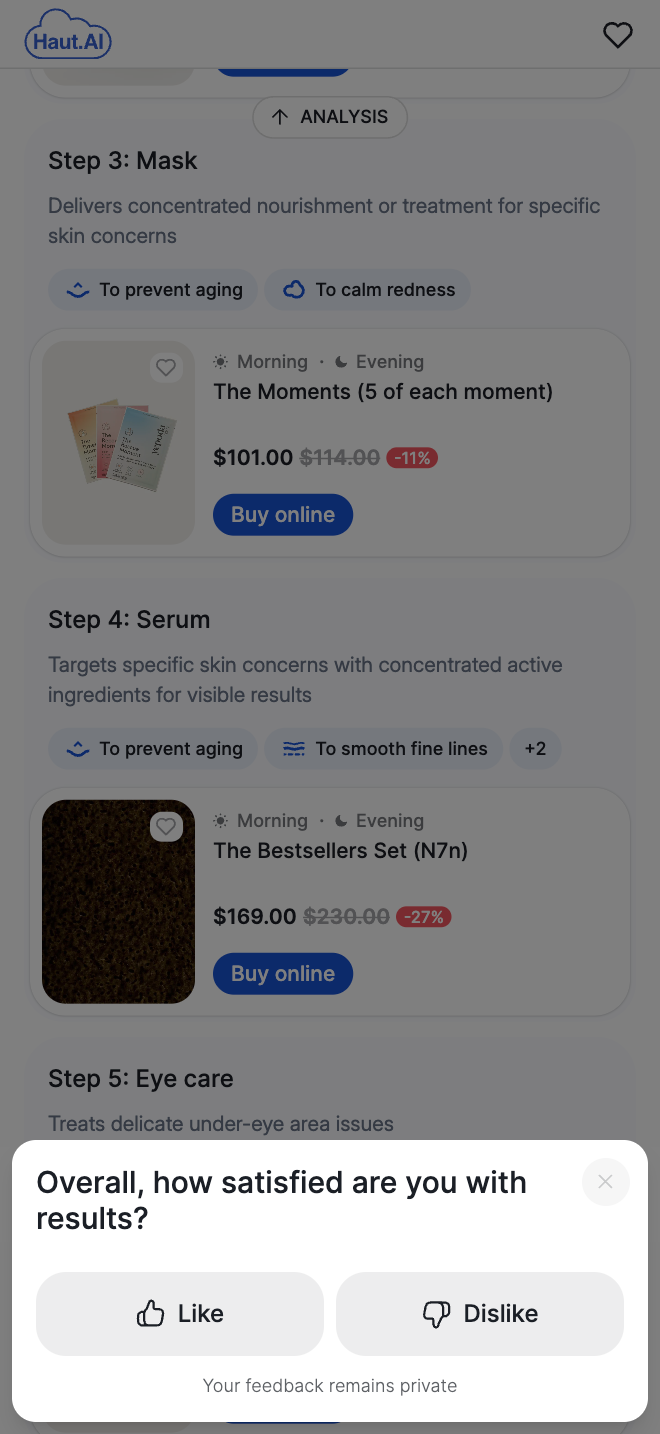
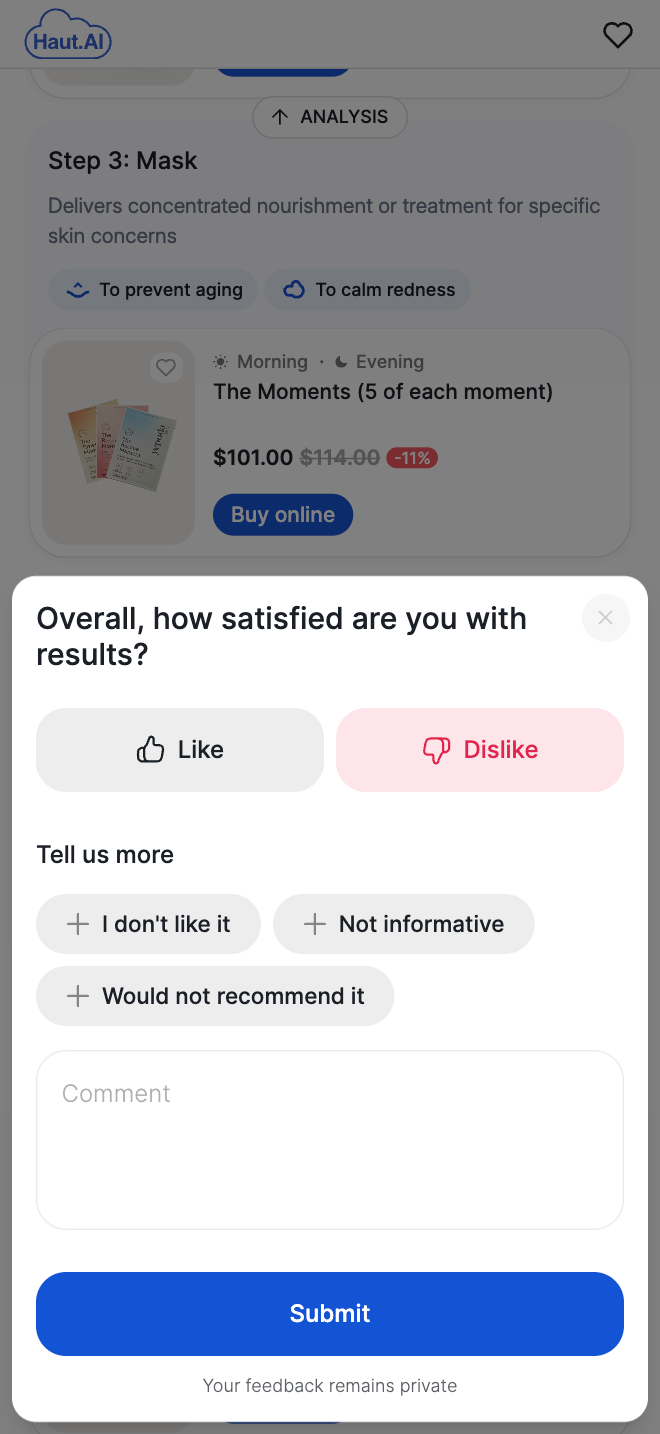
When enabled, users see the question **Overall, how satisfied are you with results?** with **Like** and **Dislike** buttons at the bottom of the results screen. Choosing **Dislike** adds a **Tell us more** list of reasons and an optional comment. The user taps **Submit** to send either answer, or closes the prompt to skip it. The prompt is shown once per session and never blocks the results.
Default prompt
After choosing Dislike
To turn it on, set **End-of-experience feedback** to **Enabled** and review the **Dislike reasons** list. A default set is pre-filled. You need between 3 and 9 reasons, each up to 80 characters; edit them, delete them, or click **Add reason** to fit your app.
The prompt fires the `FeedbackShown` and `FeedbackSent` events, so you can measure response rates in Google Analytics. See [Google Analytics Events Reference](/haut.ai/haut.ai-features/consumer-apps/connect-google-analytics-to-your-consumer-app/google-analytics-events-reference.md).
***
{% hint style="warning" %}
Not a Haut.AI client yet?
{% endhint %}
Book a demoPlatform overview on haut.ai
---
# Agent Instructions
This documentation is published with GitBook. GitBook is the documentation platform designed so that both humans and AI agents can read, navigate, and reason over technical content effectively. Learn more at gitbook.com.
## Querying This Documentation
If you need additional information that is not directly available in this page, you can query the documentation dynamically by asking a question.
Perform an HTTP GET request on the current page URL with the `ask` query parameter, and the optional `goal` query parameter:
```
GET https://docs.saas.haut.ai/haut.ai/haut.ai-features/consumer-apps/configure-advanced-settings.md?ask=&goal=
```
`ask` is the immediate question: it should be specific, self-contained, and written in natural language.
`goal` is optional and describes the broader end goal you are ultimately trying to accomplish on behalf of the user. GitBook uses it to tailor the answer towards what is most useful for that goal.
The response will contain a direct answer to the question and relevant excerpts and sources from the documentation.
Use this mechanism when the answer is not explicitly present in the current page, you need clarification or additional context, or you want to retrieve related documentation sections.